MacBook: the ESP32 does not start on a USB-C port
Plugged straight into a USB-C port of an Apple MacBook Air (M4), and likely other MacBook models and USB-C laptops, the ESP32 board stays dark and does not boot. It looks dead, but it is not: the board's USB-C socket lacks the resistors that tell a USB-C port to switch power on.
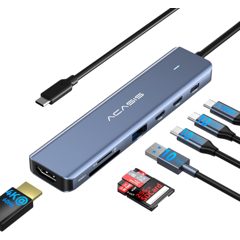
Fix: connect through a USB hub with USB-A ports, using a data USB-A to USB-C cable. This hub works with an Apple laptop: Amazon →
Source code
Firmware source code and host-side tests.
Download .zip 212 KBESP32 · Arduino · TFT_eSPI · TMCStepper · NimBLE
- Install PlatformIO
macOS · tested
$ brew install platformioLinux · untested$ pipx install platformioThen allow serial access:sudo usermod -aG dialout $USER, and log out and back in.Windows · untestedInstall VS Code with the PlatformIO IDE extension and run the commands below in its PlatformIO terminal. Windows may need the WCH CH340 USB driver. - Unzip and open a terminal in it
$ cd AutoSharpener - Connect the ESP32Slide SW1 to
USBand plug in the charger: the screen must stay dark. Then connect through a USB-A port or a hub (see the MacBook note above), with a data A-to-C cable. The board shows up as a CH340 serial port:/dev/cu.usbserial-…on macOS,/dev/ttyUSB0on Linux,COM3or similar on Windows.pio device listshows it.Never plug in USB-C while the jack powers the ESP32Nothing on the board stops the two supplies meeting. How the JACK / USB switch works → - Build and flash
$ pio run -t upload -t monitor - Adjust to your machineMotor current, travel and speeds:
lib/Board/Board.h. - Optional: run the tests
$ ./test/native/run.shKinematics and paths, on your computer, no board needed. Needs bash and a C++ compiler: Xcode command-line tools on macOS, g++ on Linux, WSL on Windows (untested).